---
title: How to record bills in Xero | Oxford Edge
description: Oxford Edge’s step-by-step guide on how to record bills in Xero.
image: https://7321002.fs1.hubspotusercontent-na1.net/hubfs/7321002/knowledge-2.jpg
---
[Skip to content](https://oxfordedge-co-nz-7321002.hs-sites.com/blog/how-to-record-bills-in-xero#main-content)
- [About us.](https://www.oxfordedge.co.nz/about-us/)
- [About you.](https://www.oxfordedge.co.nz/about-you/)
- [What we do.](https://www.oxfordedge.co.nz/what-we-do/)
- [The crew.](https://www.oxfordedge.co.nz/our-people/)
- [Giving back.](https://www.oxfordedge.co.nz/giving-back/)
- Articles
- [Client stories.](https://oxfordedge-co-nz-7321002.hs-sites.com/blog/tag/client-stories)
- [Insights.](https://oxfordedge-co-nz-7321002.hs-sites.com/blog/tag/insights)
- [Knowledge.](https://oxfordedge-co-nz-7321002.hs-sites.com/blog/tag/knowledge)
Newsletter: Business intelligence in your inbox
For general enquiries, contact us on:
[enquiries@oxfordedge.co.nz](mailto:enquiries@oxfordedge.co.nz)
[+64 (0)3 379 6710](tel:+6433796710)
Level 3
335 Lincoln Road
Addington
Christchurch, 8024
# How to record bills in Xero
### Oxford Edge’s step-by-step guide on how to record bills in Xero.
From the main dashboard page, click the 'Business' and then 'Bills to pay' buttons.

Click 'New Bill'.
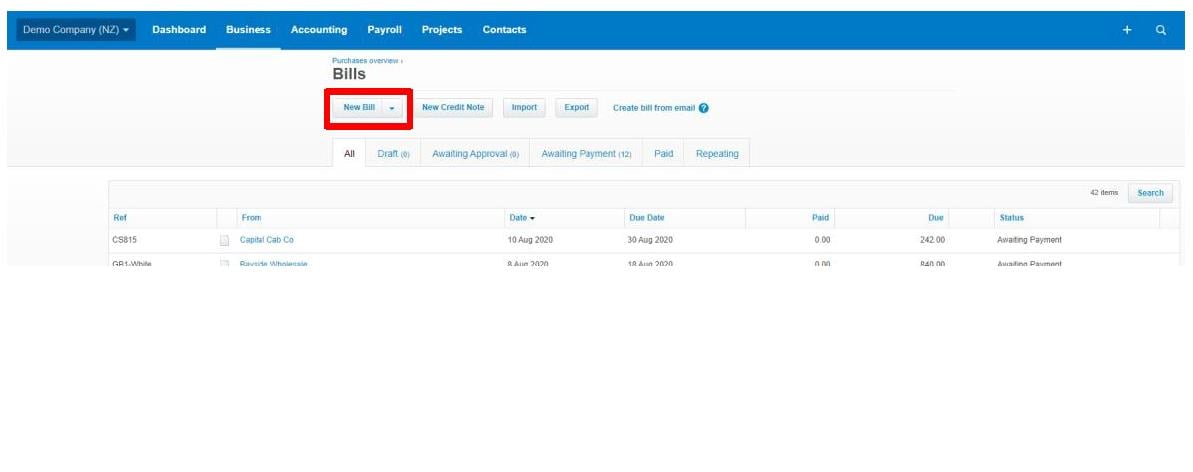
From here you can enter in the details on the invoice.
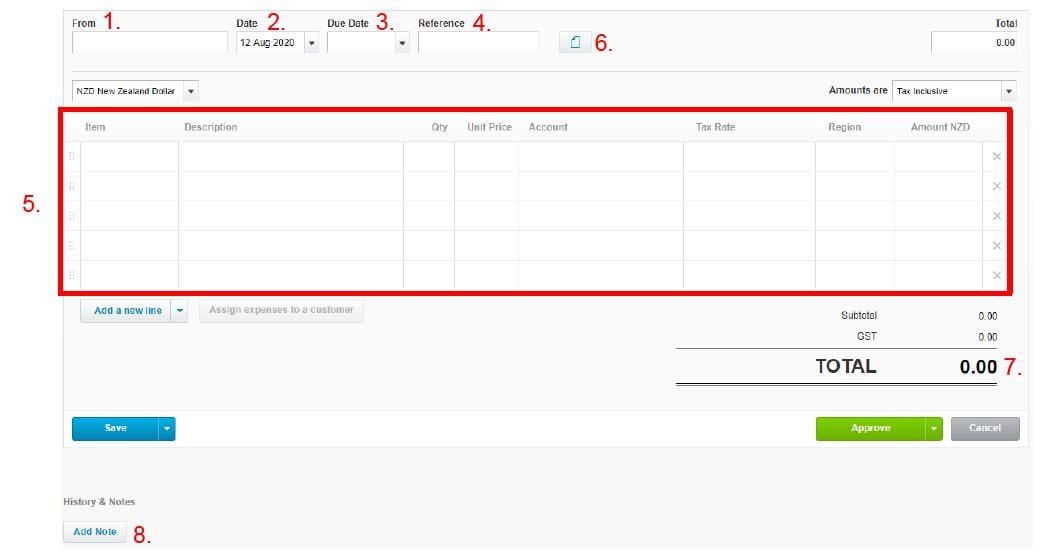
Enter the invoice as follows:
1. Supplier’s name
2. Invoice date
3. Due date
4. Reference number should match the supplier invoice
5. Enter the details of the invoice (note you must enter a quantity)
6. Attach the invoice received (this should automatically be attached if you send invoices directly to Xero)
7. Make sure this total matches the supplier invoice
8. You can add additional details here – this will not show on the invoice but will stay on Xero as a reference
Once the above has been entered click ‘Approve’.
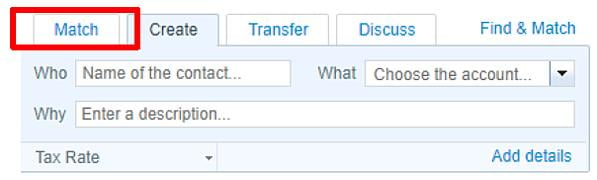
When you reconcile your bank account there will be an option to match the payment received with the invoice you created.
If you need help, give Oxford Edge a call on 03 379 6710.
[](https://oxfordedge-co-nz-7321002.hs-sites.com/blog/how-to-reconcile-bank-accounts-in-xero)
### [How to reconcile bank accounts in Xero](https://oxfordedge-co-nz-7321002.hs-sites.com/blog/how-to-reconcile-bank-accounts-in-xero)
[](https://oxfordedge-co-nz-7321002.hs-sites.com/blog/creating-invoices-in-xero)
### [Creating invoices in Xero](https://oxfordedge-co-nz-7321002.hs-sites.com/blog/creating-invoices-in-xero)
[](https://oxfordedge-co-nz-7321002.hs-sites.com/blog/understanding-your-annual-financial-statements)
### [Understanding your annual financial statements](https://oxfordedge-co-nz-7321002.hs-sites.com/blog/understanding-your-annual-financial-statements)
### HELLO. WE’RE HERE TO HELP.
For general enquiries, contact us on: [enquiries@oxfordedge.co.nz](mailto:enquiries@oxfordedge.co.nz)
[+64 (0)3 379 6710](tel:+6433796710)
If you'd like to bring your smarts to our team, contact us on: [hr@oxfordedge.co.nz](mailto:hr@oxfordedge.co.nz)
You can find us at:
Level 3
335 Lincoln Road
Addington
Christchurch, 8024
[Get directions](https://goo.gl/maps/TjQussiMxi75Pfx38)
[Privacy Policy](https://www.oxfordedge.co.nz/privacy-policy)
[](https://www.charteredaccountantsanz.com/)
© 2022, Oxford Edge Limited.
Site design by [SOMO Creative.](https://somocreative.co.nz/)
```json
{
"@context" : "https://schema.org",
"@type" : "BlogPosting",
"author" : {
"@type" : "Person",
"name" : "Oxford Edge",
"url" : "http://oxfordedge-co-nz-7321002.hs-sites.com/blog/author/oxford-edge"
},
"dateModified" : "2022-02-28T20:19:21.951Z",
"datePublished" : "2022-02-14T02:54:54.000Z",
"headline" : "How to record bills in Xero | Oxford Edge",
"image" : [ "https://fs.hubspotusercontent00.net/hubfs/7321002/knowledge-2.jpg" ],
"mainEntityOfPage" : {
"@id" : "http://oxfordedge-co-nz-7321002.hs-sites.com/blog/how-to-record-bills-in-xero",
"@type" : "WebPage"
},
"publisher" : {
"@type" : "Organization",
"logo" : {
"@type" : "ImageObject",
"url" : "https://cdn2.hubspot.net/hubfs/7321002/Asset%2013@3x.png"
},
"name" : "Oxford Edge"
}
}
```